The stack on the desk
Weeks of post lie about unopened. You scan the stack in one go, the app reads every letter, and you sort it afterwards in a few minutes, card by card.
Productivity
iPhone & iPad
Kann das weg? sorts your paperwork on your iPhone. Scan a stack of letters or load a whole folder from iCloud Drive: the app reads every document and proposes where it goes, and you decide card by card, yes or no. What stays is filed as a PDF in your archive. What can go is on a list for the shredder. The rules are those for private households in Germany.
Free · one-time purchase “Archive, Folders, Reminders” €9.99 · no subscription
Requires iOS 18.0
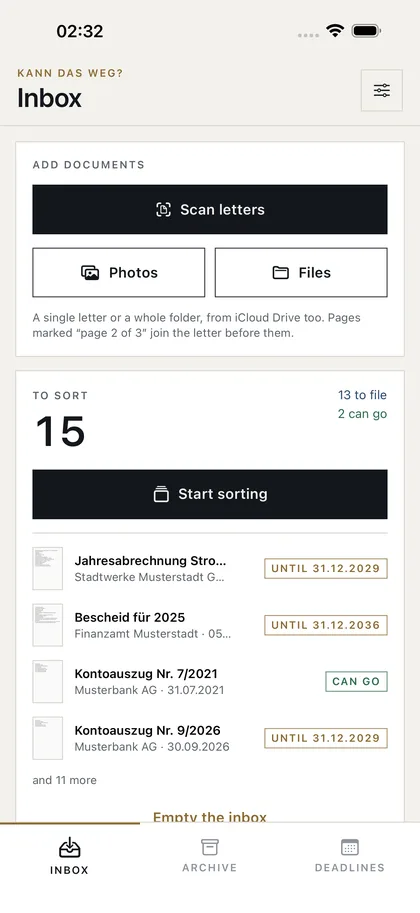
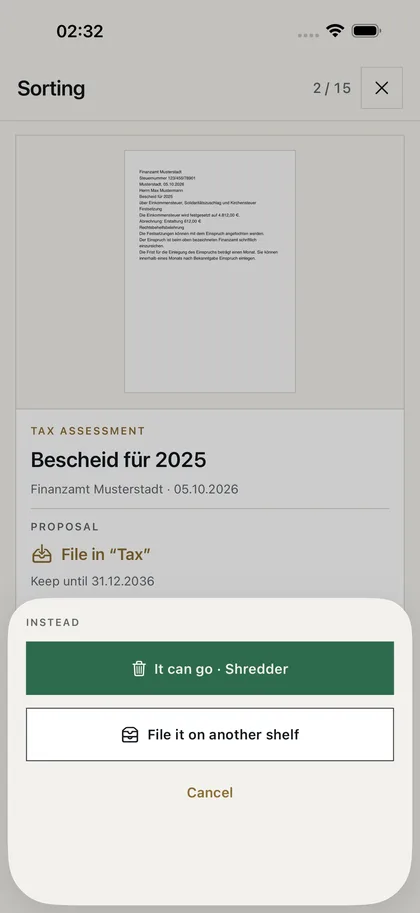
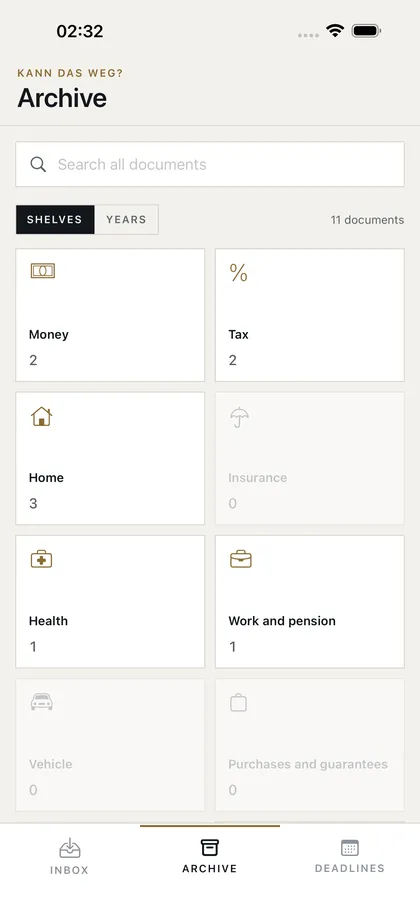
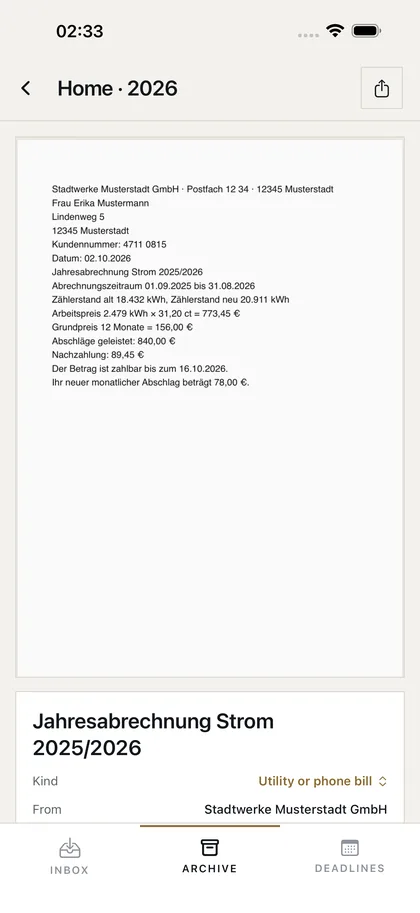
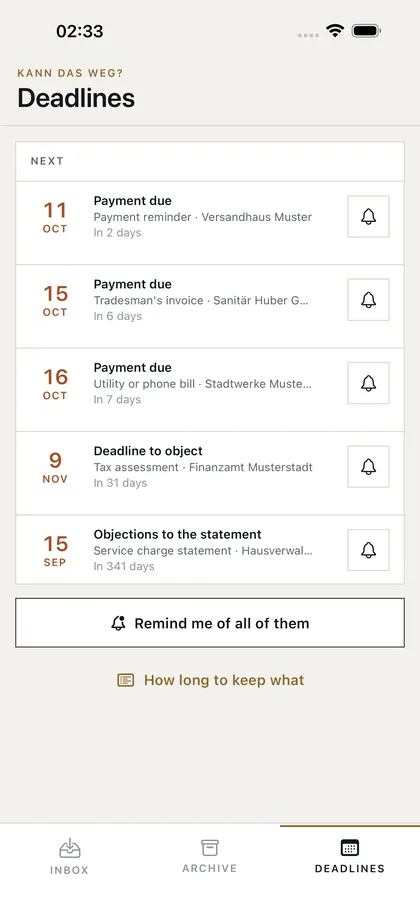
Scan letters with the camera, or open photos, PDFs and whole folders, from iCloud Drive too.
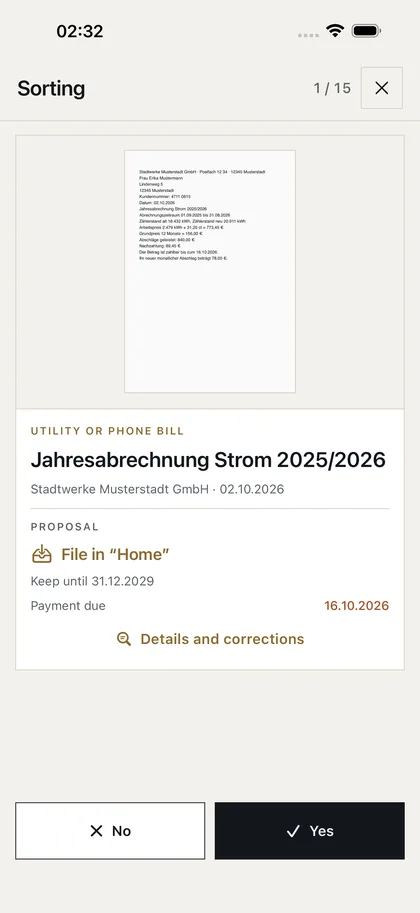
It reads every document on the iPhone: who writes, what about, how much money and by when. Then it proposes the shelf it belongs on and how long to keep it, or that it can go.
Card by card. Yes files the document. No: it can go, or it goes on another shelf. The last step can be taken back.
What stays is in the archive as a PDF, by shelf and year. What can go is on a list: into the shredder, or with the paper.
Weeks of post lie about unopened. You scan the stack in one go, the app reads every letter, and you sort it afterwards in a few minutes, card by card.
Ten years of bank statements, invoices and assessments: for every sheet the app says whether it still has to be kept. What could have gone long ago is on a list for the shredder at the end.
Whoever has scanned before often has hundreds of PDFs in no order. The app reads the whole folder, from iOS 26 also in the background, and proposes a shelf for every document.
A payment deadline, a deadline to object, a notice period: the app finds it in the letter, gathers it in one list and, with the purchase, reminds you in time.
The wage tax certificate and the assessments are on the Tax shelf, tradesmen's and doctors' invoices on Home and Health, each by year. The archive shows one whole year across the shelves, too, and shares it at once with your tax adviser.
With one switch the periods for business records apply: eight years for invoices and vouchers, ten for books and annual accounts.
German business letters follow a pattern: the sender's line above the address, an information block with numbers and the date, the subject in bold, a footer with the bank account. The app reads a letter along that pattern, not by its words alone.
It always says what it recognised the kind of document by. If it is wrong, you choose the right kind and the answer follows.
Every proposal is a question, and you have the last word. If the app wants to file a letter and you say no, you choose: it can go after all, or it belongs on another shelf. If it says a letter can go and you disagree, you choose its shelf.
A step back brings the last document back to the stack. What can go is collected on a list; the paper you throw away yourself.
Eleven shelves, each by year: Money, Tax, Home, Insurance, Health, Work and pension, Vehicle, Purchases and guarantees, Authorities, Personal, Other. Every document is a PDF under a name you find it by, such as “2026-10-02 Stadtwerke Musterstadt GmbH – Jahresabrechnung Strom 2025-2026”.
The search finds every word the app has read. When a period is over, the archive tells you what may go now, and deletes it all at once if you like. The archive is a folder on your iPhone: you see it in the Files app under On My iPhone, and it is part of the iPhone's backup. A file you move there to another shelf, or put into a shelf's folder, the app follows.
Choose a folder in the Files app, with as many documents as you like. The app fetches each file from iCloud on its own, reads it and puts it in the inbox; pages marked “page 2 of 3” join the letter before them.
From iOS 26, reading goes on when you leave the app, and the system shows its progress. If the iPhone restarts, the app goes on where it stopped the next time you open it. You can start sorting while it is still reading.
A document that is in the archive already says so on its card. Copies, which a large folder often holds, are seen before they are filed a second time.
What the letters ask of you by a date stands in one list, the nearest first: payment deadlines, deadlines to object, notice periods. With the purchase, the app reminds you before each one.
Below it are the documents whose period ends within the next six months: then they can go.
The periods the app applies, for private households in Germany. The same rule file decides in the app.
| Document | Keep | Why |
|---|---|---|
| Bank statement | 3 years from the end of the year | Private persons need not keep them. Three years from the end of the year are advised, as long as claims can still be made.§§ 195, 199 BGB |
| Payment reminder | 3 years from the end of the year | Check it and pay or object in time. Then keep it three years as proof.§§ 195, 199 BGB |
| Cancellation confirmation | 3 years from the end of the year | Three years from the end of the year, as proof that the contract has ended.§§ 195, 199 BGB |
| Contract | While it runs, and three years after | Keep it while the contract runs, and three years after.§§ 195, 199 BGB |
| Wage tax certificate | 5 years from the end of the year | Until that year's tax assessment can no longer be changed.§§ 169, 170 AO |
| Donation receipt | 4 years from the end of the year | For the tax return: you must be able to show it until a year after that year's tax assessment. Four years from the end of the year cover a late return too.§ 50 Abs. 8 EStDV |
| Tax assessment | 10 years from the end of the year | Not required but advisable: tax assessments are often needed as proof, for a loan, parental benefit or the pension.Empfehlung |
| Tradesman's invoice | 5 years from the end of the year | Work on the house or flat: a two-year duty to keep, five years of warranty on building work, and for the tax until the assessment is final.§ 14b UStG, § 634a BGB |
| Utility or phone bill | 3 years from the end of the year | Three years from the end of the year: claims or refunds can be made that long.§§ 195, 199 BGB |
| Service charge statement | 3 years from the end of the year | Three years from the end of the year. Objections to the statement must be raised within twelve months.§ 556 Abs. 3 BGB, § 195 BGB |
| Insurance documents | While it runs, and three years after | Keep them while the insurance runs, and three years after.§§ 195, 199 BGB |
| Medical bill | 5 years from the end of the year | For the tax return (medical costs) and the insurer's refund, until the tax assessment is final.§ 33 EStG, §§ 169, 170 AO |
| Doctor's letter or findings | For good | Keep them: doctors' letters and findings help with later treatment and often cannot be had again. There is no period. |
| Payslip | Until you retire | Keep them until you retire: payslips prove your contribution periods if your pension account has gaps.Kontenklärung, § 149 SGB VI |
| Pension notice | For life | Keep it for life. |
| Pension statement | 15 months from its date | Until the next one arrives; it comes every year. Check the insurance periods against it first. |
| Vehicle papers | As long as you own it | Keep them as long as you own the vehicle. |
| Purchase receipt | 2 years from its date | That is how long the statutory warranty lasts. With a longer manufacturer's guarantee, until it ends.§ 438 BGB |
| Official decision | Check it, then as long as it applies | Check the decision: there is a deadline to object. Then keep it for as long as it applies.§ 70 VwGO, § 84 SGG |
| Certificate | For life | Keep it for life: certificates are hard to replace. |
| Personal letter | Up to you | A personal letter: there is no period for it. Whether it stays is up to you. |
| Delivery note or order confirmation | Until the goods are there | It can go once the goods have arrived. Keep the invoice instead. |
| Advertising | It can go | There is no reason to keep advertising. |
Self-employed people and businesses must keep records: invoices and other accounting vouchers for eight years, books and annual accounts for ten. (§ 147 AO, § 257 HGB)
Recommendations, not legal advice. When in doubt, keep it.
The periods are recommendations for private households in Germany, not legal advice. When in doubt, keep it.
€0
Up to three pages or files at a time, every answer and every deadline, an archive of ten documents.
The free version can be used without a time limit.
€9.99
An archive of any size, whole stacks and folders at once, and a reminder before every deadline.
Pay once, use it for good. No subscription.
The app collects no data. Everything you open or create stays on your device until you share it yourself.
Camera: Used only by the system's document scanner while you scan. The page is read on the device and stored only if you file it.
Photos and files: Only the photos and files you choose. Files in iCloud Drive are downloaded by the system for this; the app reads them, puts a copy in its inbox and does not change the original.
Archive: What you file is stored as a PDF in the app's folder on your iPhone, with iOS file protection, and is part of the iPhone's backup. It is not sent anywhere. You see it in the Files app and can delete it there or in the app.
Background: From iOS 26, a large folder is read on when you leave the app. The system shows the progress, and you can stop it there.
Notifications: Only for the reminders you set. The app keeps the text of each reminder.
No. The periods are general recommendations for private households in Germany, with the provisions they rest on. When in doubt, keep a document.
As a private person you need not keep them. The app advises three years from the end of the year, as long as claims can still be made (§§ 195, 199 BGB). The self-employed must keep them for eight years.
Yes, with the purchase. Choose the folder in Files; the app fetches and reads one document after another and puts each in the inbox. From iOS 26 it reads on in the background, and after a restart it goes on where it stopped. You can start sorting while it is still reading.
In the app's folder on your iPhone, visible in the Files app under On My iPhone › Kann das weg? › Ablage, and in the iPhone's backup. Deleting the app deletes this folder too. Copy the Ablage folder to another place in Files first if you want to keep the documents.
For most letters a copy is enough as proof. Keep certificates, vehicle papers and contracts in the original as well; the app says so for these documents.
Tap “Details and corrections” on the card, choose the right kind, and the answer and the shelf follow. If the date is wrong, change it the same way.
Yes. In the archive, switch to Years, open the year and share it: every PDF of that year goes at once, by Mail, AirDrop or into Files. A single shelf can be shared the same way.
A document already in the archive says so on its card. If it is the same, say no and let it go; the copy in your folder stays where it is.
Yes. The empty inbox offers five example letters, invented ones: read, sorted and filed like your own. Delete them from the archive afterwards.
No. Text recognition and the rules run on the iPhone. The app has no server and no account.
Tap “Restore purchase” on the purchase card in the app. A one-time purchase is tied to your Apple account and does not have to be paid for again.